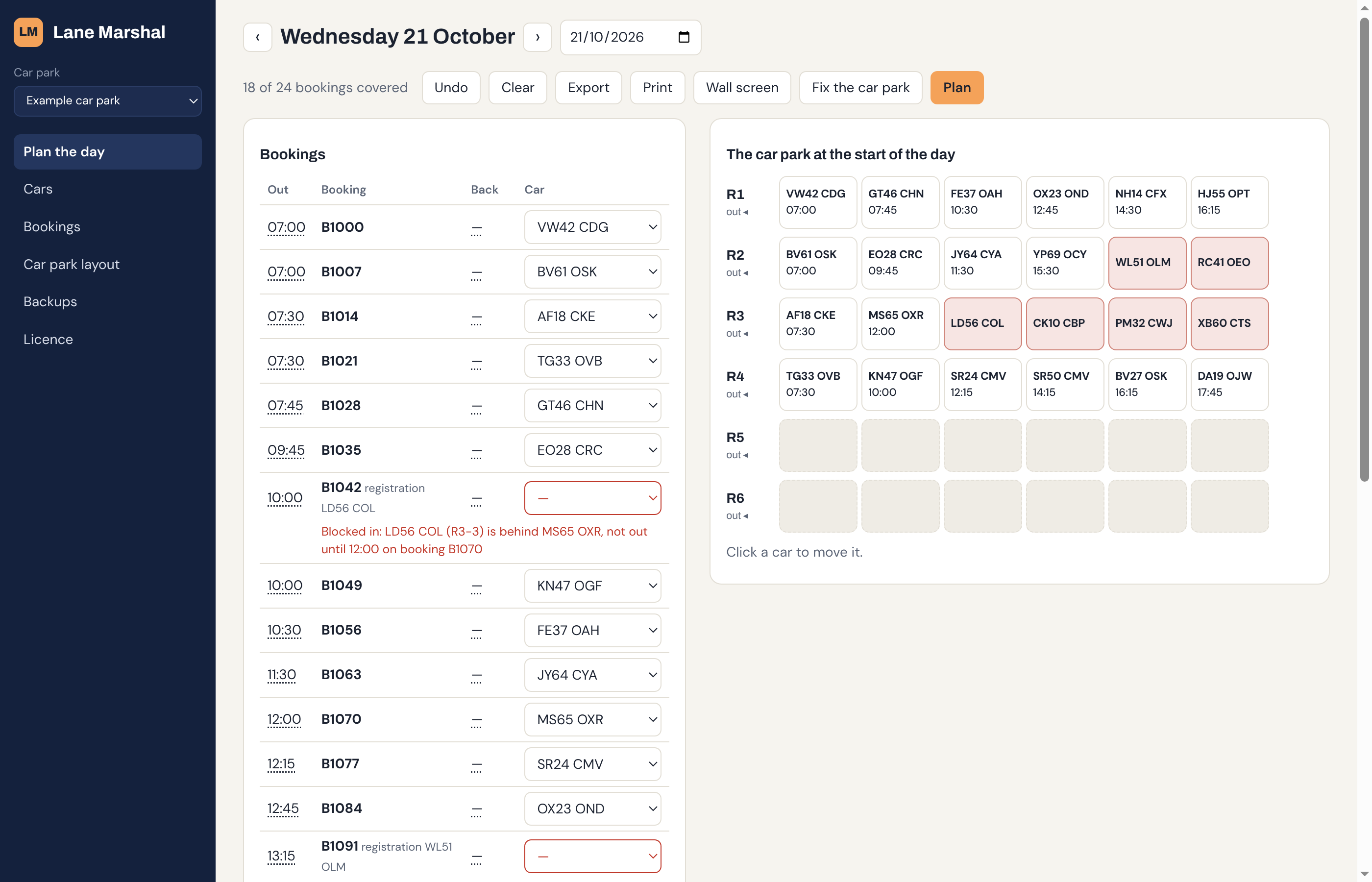
Nobody gets blocked in.

Lane Marshal works out which vehicle goes out on which job, and where each one parks when it comes back, so the right one is always at the front of its lane.

Download for Windows See how it works Free for 14 days. No card, no account.
Lane Marshal planning a day at a valet car park: a list of bookings beside a diagram of six parking lanes, with the cars that are blocked in shown in red

Made for yards where vehicles park nose to tail

When vehicles are parked in lanes, only the one at the front can leave. Get the order wrong and someone spends the morning shuffling cars, or a job goes out late. Lane Marshal plans the order for you.

Valet and stack parking

Cars out on time

Airport and event valet, park and ride, dealerships. Each booking gets its car, and cars come back to a space that's clear when the customer returns.

Last-mile delivery

Vans ready for each route

Match vans to routes by size and charge, so the first route out has its van at the front and every electric van has the charge its route needs.

Any lane-parked yard

Your words, your layout

Lanes that open at one end or both, vehicles off the road, your own names for things. Set up your own yard once and plan every day from it.

How it works

Scroll through a morning at a delivery depot: seven routes, eight vans, one of them off the road.

  1. 1

    Draw your yard

    Name your lanes, say how many spaces each has and which end vehicles leave from. You do this once.

  2. 2

    Bring in the day

    Paste or import the day's vehicles and jobs from a spreadsheet saved as CSV, and say where everything is parked.

  3. 3

    Press Plan

    Every job gets a vehicle that can actually get out in time. When one can't, it says why in plain English.

    • Change any choice yourself and it tells you what that causes
  4. 4

    Fix what's boxed in

    Fix lists the moves that free a blocked vehicle. Here, one move and every route is covered.

  5. 5

    Park them for later

    As vehicles come back, it says where each one should go, so the next one out is always at the front.

Questions

Where is my data kept?

On your computer. Lane Marshal works offline, and nothing about your yard, vehicles or jobs is sent anywhere unless you switch on sync, which keeps several computers in step through lanemarshal.com. Only computers with your licence key can see synced data.

What does it need?

A Windows 10 or 11 PC. It updates itself when a new version is out.

How does the licence work?

A subscription for a number of sites. You get a licence key to paste into the app, and it renews itself while your subscription is running. If a renewal is late, the app keeps working for 14 days.

Can more than one computer use it?

Yes. Switch on sync and every computer with your licence key sees the same yard and the same plan, so a planner in the office and a wall screen in the yard stay in step.

Can I try it first?

Yes. Every install gets 14 days free with everything switched on, and two example yards to try it out.

Try it on tomorrow's jobs

Install it, set up your yard and see what it plans.