Car auctions and storage yards

Every lot out in order. Every collection at the front.

Lane Marshal plans a block-parked auction or storage yard around the sale and the collections, so the car that's wanted next is never behind one staying another week.

Download for Windows See it at an auction yard Free for 14 days. No card, no account. Windows may say it protected your PC while we're new. Click More info, then Run anyway.
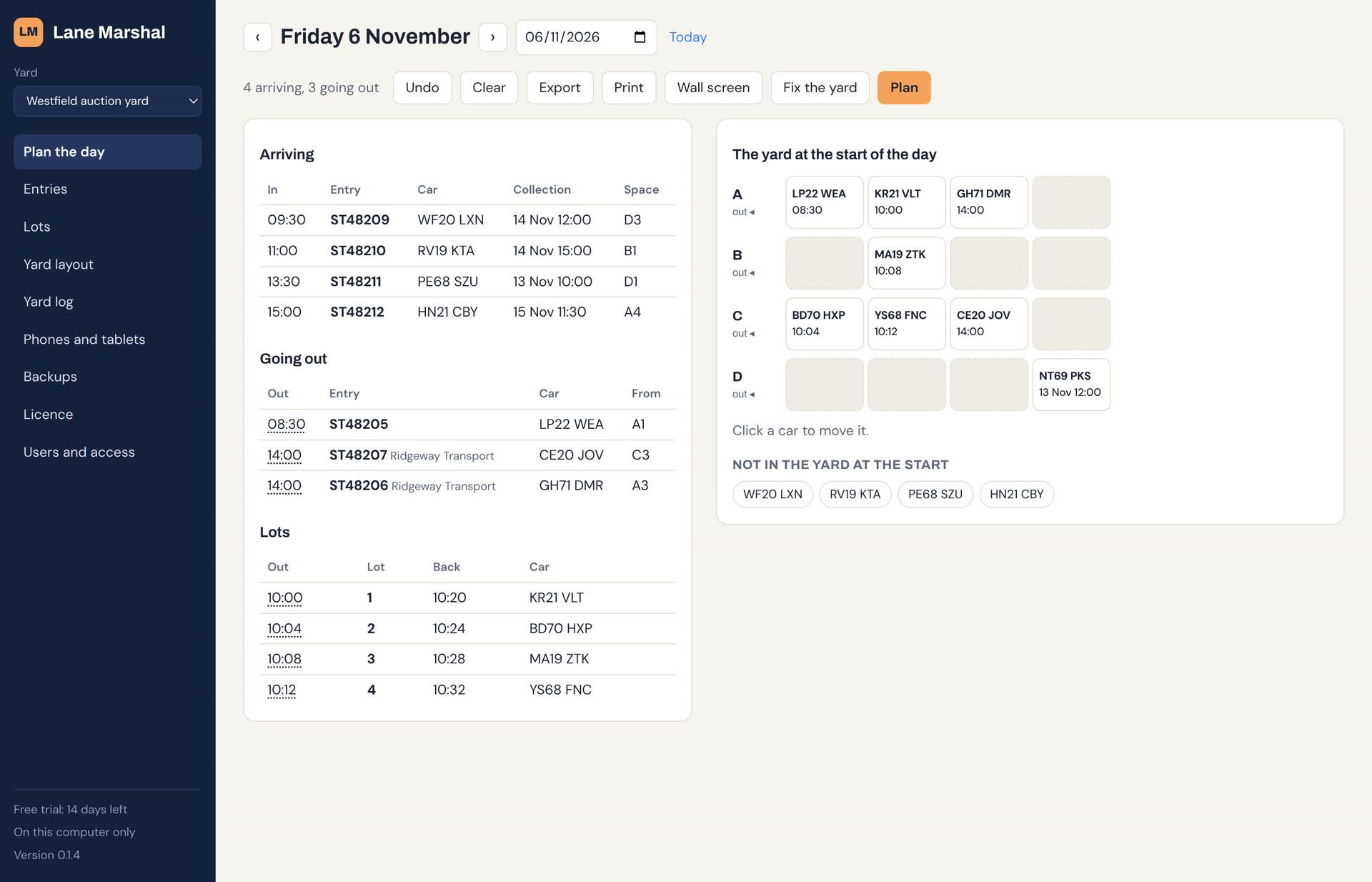
Lane Marshal at a car auction yard: the sale's lots and the day's collections beside a diagram of the yard's rows

Sound familiar?

Your auction system knows the lot order and who bought what. It doesn't know which car is parked behind which.

Lot 40 is three deep

The sale is running and the next lot is behind two cars that aren't in it, so the hall waits while drivers shuffle.

The transporter's waiting

A driver turns up for six cars spread across the yard, each one behind something staying for next week's sale.

Check-ins go wherever there's a gap

New entries arrive all day and get parked in the nearest space, in front of cars going out tomorrow.

What it does at an auction or storage yard

Lot order

Lots out in order

Each lot's time into the hall is when that car has to get out. Unsold cars and cars waiting for collection come back, and it says where.

Collections

Buyers and transporters

Each car's collection time is planned for, so the cars on a transporter's load are at the front when it arrives.

Check-ins

A space for every check-in

As cars arrive for the next sale or for storage, it says where each one should park so it doesn't block anyone going out sooner.

Fixes

Blocked-in cars freed

It names the car that's blocked in, by which cars and when they go, and Fix lists the moves that free it, in the order to make them.

Your stock list

From your auction system

Import the stock list and the sale's lot list from a CSV export: stock number, VRM, date in, collect by, lot and lot time. It reads the columns by name.

Drivers

On the drivers' phones

Shunters see what's going out next and where it is, and record each move as they make it, so the plan stays right.

See it at an auction yard

This is the app itself. Scroll through a sale day at an auction yard: four lots through the hall, two cars on a transporter, and check-ins for next week.

  1. 1

    Draw your yard

    Name your rows, say how many cars each holds and which end they come out of. You do this once.

  2. 2

    Bring in the sale

    Import the stock list and the sale's lot list from a spreadsheet saved as CSV, and say where each car is parked.

  3. 3

    Press Plan

    It plays the day through: every lot, every collection, every check-in. When a car will be blocked in, it says by which cars, in plain English.

  4. 4

    Fix what's blocked in

    Lot 3 is behind a car staying for next week's sale, and the transporter's two cars would be boxed in by check-ins. Fix moves the one car to an empty row before the sale, and all three are clear.

  5. 5

    Park the check-ins

    Cars arriving for next week are given spaces behind the ones going out sooner, so tomorrow starts in order too.

Compared with what you use now

Lane Marshal sits alongside your auction system. It doesn't run the sale; it gets each car out when it's wanted.

Swipe the table to see Lane Marshal →

Whiteboard or spreadsheetAuction or stock systemLane Marshal
Runs the sale, bids and invoicesNoYesNo, keep your own
Knows where each car is parkedIf someone writes it downSometimes, by rowYes, space by space
Says where each check-in parksNoNoYes, by when it next goes out
Warns before a lot is blocked inNoNoYes, and lists the moves
Plans for transporter collectionsNoNoYes
CostFreePer vehicle or per saleOne subscription

Questions

Does it replace our auction system?

No. It takes the stock list and the lot list from it, and plans where cars park and which to move.

What about cars that don't sell?

A lot comes back to the yard after it's been through the hall, and stays until its collection date. Change that date when the vendor decides, and it plans again around it.

We store cars rather than auction them.

Then leave out the lot list. Each car has a date in and a date it's collected, and it plans the yard so the car being called for is at the front.

Does it need the internet?

No. It runs on a Windows PC and keeps working if the connection drops. Sync, if you switch it on, catches up when it's back.

We have more than one yard.

One subscription covers as many sites as you choose. Each has its own layout, stock and sales.

Try it on your next sale

Install it, draw your yard and see what it plans. The example yard in the app is set up as an auction yard on a sale day.

Download for Windows See pricing Windows may say it protected your PC while we're new. Click More info, then Run anyway.