Delivery and EV van depots

The right van at the front for every route.

Lane Marshal matches vans to routes by size, power and charge, and plans where each one parks, so the first route out isn't stuck behind the last one back.

Download for Windows See it at a delivery depot Free for 14 days. No card, no account. Windows may say it protected your PC while we're new. Click More info, then Run anyway.
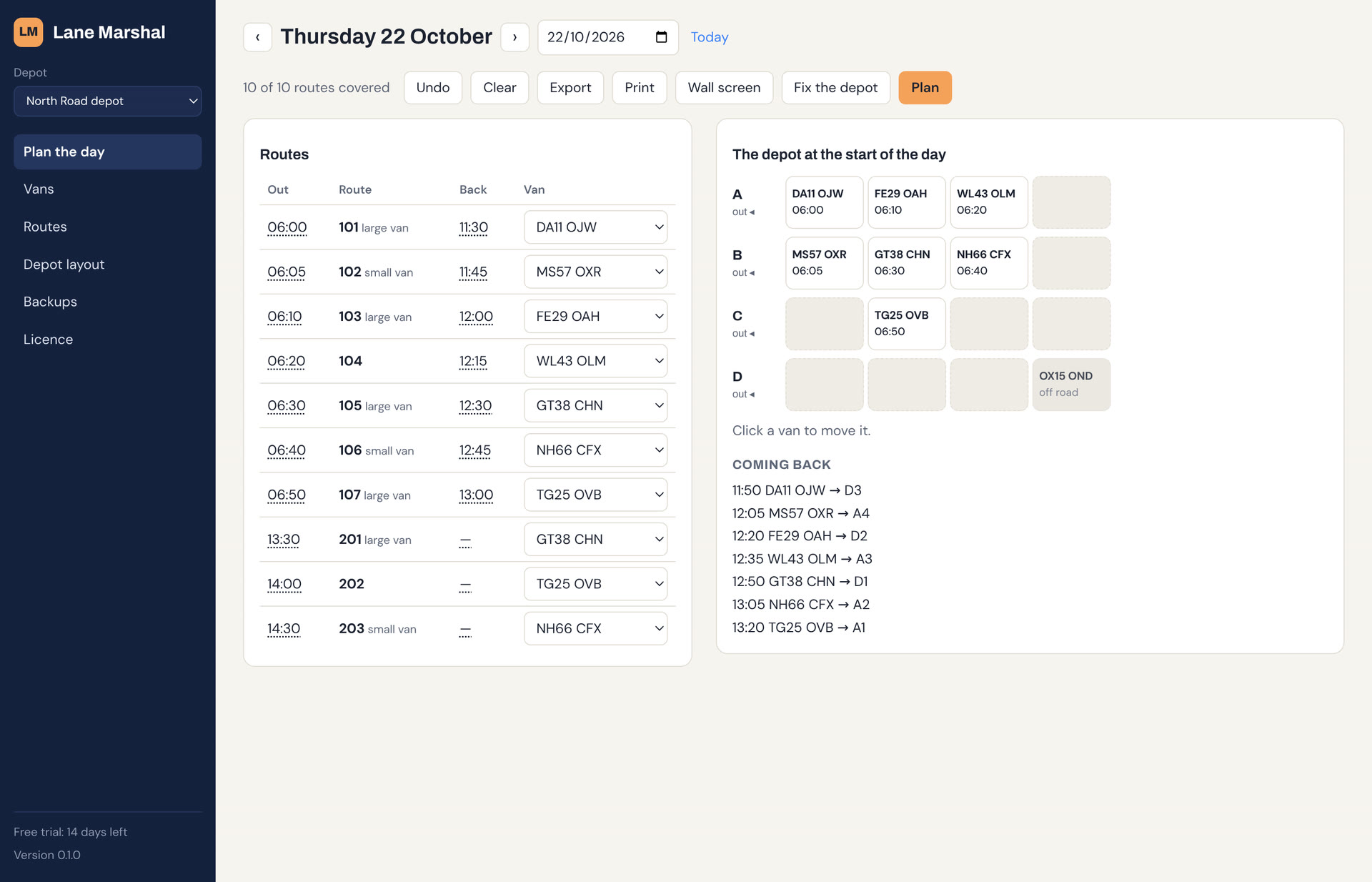
Lane Marshal at a delivery depot: the day's routes beside a diagram of the depot's lanes

Sound familiar?

Your route planner says where each van is going. Nobody plans which van, or where it's parked.

The 06:00 shuffle

The van for the first route is boxed in at the back, and drivers wait while three others are moved.

Not enough charge

An electric van goes out on a long route with 40% because nobody knew which van had been on a charger.

The second wave

Vans back at lunchtime park wherever there's room, and block in the vans for the afternoon routes.

What it does at a delivery depot

Matching

Vans matched to routes

By size, fuel or power, and the charge each route needs. If no van fits, it says which one came closest and why not.

Charging

Chargers are spaces

It knows which spaces have chargers and how fast they charge, so it can tell whether a van will be charged in time.

Second waves

Vans out twice a day

Routes that come back and go out again, with your turnaround time between. It plans where each returning van parks.

Fixes

Boxed-in vans freed

Plan says which route's van can't get out, and Fix lists the moves that free it.

Off road

Off-road vans kept out of it

Mark a van off road and it's never planned, and it says when one is in another's way.

Your routes

From your route planner

Import the day's routes from a CSV export. It reads the columns by name.

See it at a delivery depot

This is the app itself. Scroll through a morning at a delivery depot: ten routes, eight vans, one of them off the road.

  1. 1

    Draw your depot

    Name your lanes, say how many spaces each has and which end vehicles leave from. You do this once.

  2. 2

    Bring in the day

    Paste or import the day's vans and routes from a spreadsheet saved as CSV, and say where everything is parked.

  3. 3

    Press Plan

    Every route gets a vehicle that can actually get out in time. When one can't, it says why in plain English.

  4. 4

    Fix what's boxed in

    A route's van is boxed in behind one that's off the road. Fix moves it out of the way and every route is covered.

  5. 5

    Park them for later

    As vans come back from the morning routes, it says where each one should go, so the afternoon's vans are at the front.

Compared with what you use now

Lane Marshal starts where your route planner stops: it plans which van, and where it's parked.

Swipe the table to see Lane Marshal →

Whiteboard or spreadsheetRoute plannerLane Marshal
Plans routes and dropsNoYesNo, keep your own
Matches vans to routes by size and chargeBy handSometimes, by van typeYes, van by van
Knows which vans are on chargersIf someone writes it upNoYes
Says where each van parksNoNoYes, with the reason
Warns before a van is boxed inNoNoYes, and lists the moves
CostFreePer vehicle or per driverOne subscription per depot

Questions

Does it plan routes?

No. It starts where your route planner stops: which van goes on each route, and where vans park so they can get out.

Does it talk to our chargers?

Not directly yet. You can type or import each van's charge, and it works out what a van will have by the time it goes from how fast your chargers charge. Reading charge from the chargers themselves is on our list.

We run two waves a day.

That's what it's built for. Give routes a return time and it plans the second wave with your turnaround time between.

Does it need the internet?

No. It runs on a Windows PC and keeps working if the connection drops. Sync, if you switch it on, catches up when it's back.

We have several depots.

One subscription covers as many sites as you choose. Each has its own layout, vans and routes.

Try it on tomorrow's routes

Install it, draw your depot and see what it plans. The example depot in the app is set up for a delivery depot.

Download for Windows See pricing Windows may say it protected your PC while we're new. Click More info, then Run anyway.