Valet and airport parking

Every car at the front when its owner lands.

Lane Marshal plans where each car parks in your stacked rows, so the car going out next is never boxed in behind one that's staying all week.

Download for Windows See it at a valet car park Free for 14 days. No card, no account. Windows may say it protected your PC while we're new. Click More info, then Run anyway.
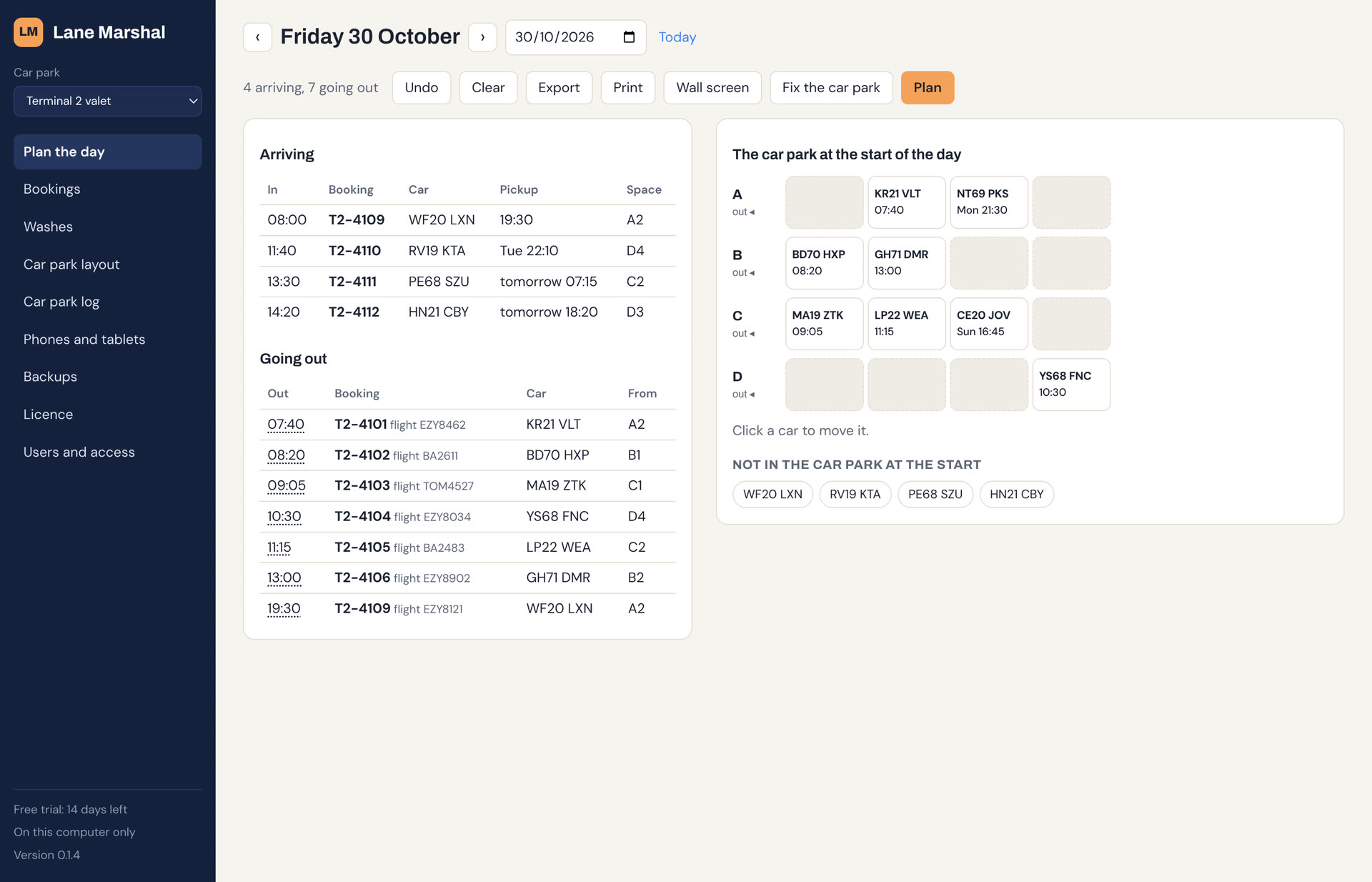
Lane Marshal at an airport valet car park: the day's bookings beside a diagram of the parking rows

Sound familiar?

Stack parking fits more cars in. It also means only the car at the front of a row can leave.

Shuffling cars at 05:00

A car booked out first thing is three deep behind cars staying all week, and someone spends half an hour moving them.

Flights that change

An early or late return turns yesterday's careful stacking into a puzzle, usually when the desk is busiest.

It lives in one person's head

The rows work because one experienced driver remembers them. On their day off, they don't.

What it does at a valet car park

Drop-offs

A space for each car before it arrives

Plan gives every car due in a space that keeps it clear of cars going home sooner, so the drivers know where it goes before the customer pulls up.

Before the customer

Spots the boxed-in car early

Plan shows each booking whose car can't get out in time, in a sentence: which car is in the way, and until when.

When times change

Lists the moves to fix it

Fix gives the fewest moves that get every car out, and which cars have to come out first and go straight back.

Extras

Washes and valets

Send a car to the wash bay and back. It says where to park it when it returns, so it doesn't block anyone.

Your bookings

From your booking list

Import a CSV export of your bookings: reference, registration, drop-off and pickup. It reads UK dates and 24-hour times, and updates each booking by its reference when you import again.

Everyone

On the wall and every PC

A wall screen for the drivers' room, a printed sheet for the day, and sync to keep the desk and the office in step.

See it at a valet car park

This is the app itself. Scroll through a day at an airport valet car park: eight cars already in, four drop-offs and seven pickups.

  1. 1

    Draw your car park

    Name your lanes, say how many spaces each has and which end vehicles leave from. You do this once.

  2. 2

    Bring in the bookings

    Paste or import your booking list from a spreadsheet saved as CSV, and say where the cars already in are parked.

  3. 3

    Press Plan

    Every car due in gets a space, and every pickup is checked. When a car would be blocked in, it says why in plain English.

  4. 4

    Fix what's boxed in

    The 07:40 pickup is behind a car not going until 10:30. Fix moves that one car to the empty row, and every car can get out.

  5. 5

    Spaces for the drop-offs

    Each car due in already has its space, in front of cars staying longer, so the next pickup is always at the front.

Compared with what you use now

Lane Marshal sits alongside your booking system. It doesn't take bookings or payments; it plans the rows.

Swipe the table to see Lane Marshal →

Whiteboard or spreadsheetBooking and payment systemLane Marshal
Knows when each car goes outIf someone writes it upYesYes, imported from your bookings
Says which space to park inNoNoYes, with the reason
Warns before a car is boxed inNoNoYes
Lists the moves to free itNoNoYes, fewest moves first
Takes bookings and paymentsNoYesNo, keep your own
CostFreeUsually a share of each bookingOne subscription per car park

Questions

What booking systems does it work with?

Any that can export the day's bookings as a spreadsheet (CSV). Lane Marshal finds the columns by name, so a booking reference, a registration, a drop-off and a pickup are all it needs. Import again whenever the list changes: bookings are updated by reference, and cancelled ones are marked. Download a sample booking list.

What happens when a flight is late?

Click the pickup time and change it. The day is planned again around it, leaving the cars already in where they are. If the change boxes a car in, Fix lists the moves to sort it out.

Can rows open at both ends?

Yes. Each row can be a dead end, a drive-through, or open at both ends, and it plans for each.

Does it need the internet?

No. It runs on a Windows PC and keeps working if the connection drops. Sync, if you switch it on, catches up when it's back.

We run several car parks.

One subscription covers as many sites as you choose. Each has its own layout, cars and bookings.

Try it on tomorrow's bookings

Install it, draw your car park and see what it plans. The example car park in the app is set up for valet parking.

Download for Windows See pricing Windows may say it protected your PC while we're new. Click More info, then Run anyway.