Car rental and dealer compounds

The booked car on the ready line, not behind it.

Lane Marshal matches cars to the day's hires by car group, and plans the compound so each customer's car can be driven straight out.

Download for Windows See it at a rental branch Free for 14 days. No card, no account. Windows may say it protected your PC while we're new. Click More info, then Run anyway.
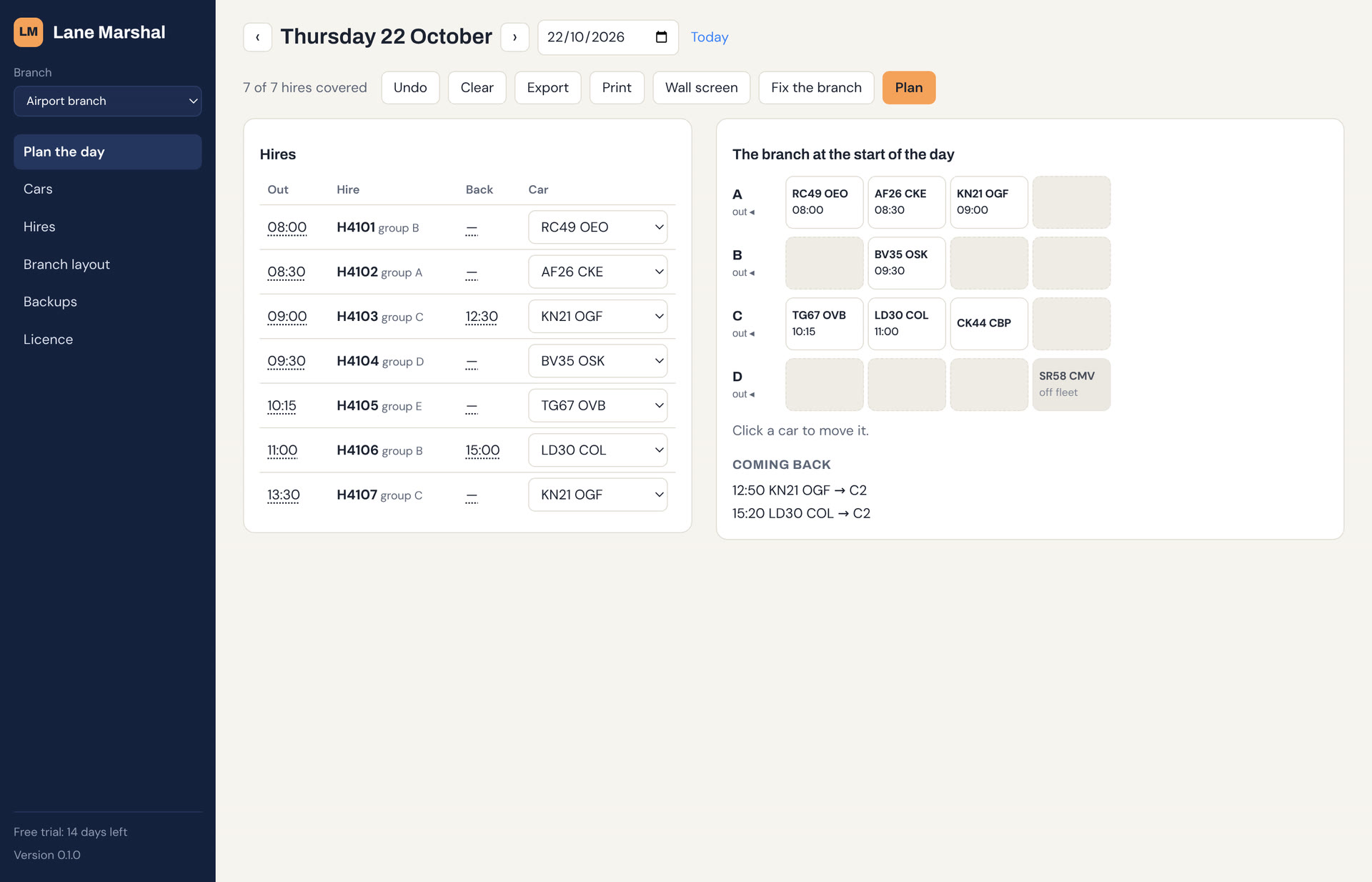
Lane Marshal at a car rental branch: the day's hires beside a diagram of the compound's rows

Sound familiar?

Your rental system knows who's coming and which group they booked. It doesn't know which car is boxed in.

Blocked in on the ready line

The customer's at the desk and their car is two deep behind a car that's not going out until tomorrow.

Off-fleet cars in the way

A car waiting for a repair ends up at the front of a row, and every car behind it is stuck.

Returns parked anywhere

Cars come back through the day and go in the nearest space, in front of the afternoon's pickups.

What it does at a rental branch

Matching

Cars matched to hires

By car group and fuel, and the charge an electric hire needs. If no car fits, it says which came closest and why not.

Off fleet

Off-fleet cars kept out of it

Mark a car off fleet and it's never matched, and it says when one is in another's way.

Fixes

Boxed-in cars freed

Plan says which hire's car can't get out, and Fix lists the moves that free it, before the customer arrives.

Returns

Returns told where to go

As hires come back, it says where each car should park, with your cleaning time before it goes out again.

Your reservations

From your rental system

Import the day's reservations from a CSV export: reference, pickup time, car group. It reads the columns by name.

Dealers

Dealer compounds too

Stock, handovers and PDI slots are jobs like any other, so the car being handed over is at the front.

See it at a rental branch

This is the app itself. Scroll through a morning at an airport rental branch: seven hires, eight cars, one of them off fleet.

  1. 1

    Draw your branch

    Name your lanes, say how many spaces each has and which end vehicles leave from. You do this once.

  2. 2

    Bring in the day

    Paste or import the day's cars and hires from a spreadsheet saved as CSV, and say where everything is parked.

  3. 3

    Press Plan

    Every hire gets a vehicle that can actually get out in time. When one can't, it says why in plain English.

  4. 4

    Fix what's boxed in

    The 09:30 hire's car is behind one that's off fleet. Fix moves it to an empty row and every hire is covered.

  5. 5

    Park them for later

    As hires come back, it says where each car should go, so the next pickup is always at the front.

Compared with what you use now

Lane Marshal sits alongside your rental system. It doesn't take reservations; it gets the right car out.

Swipe the table to see Lane Marshal →

Whiteboard or spreadsheetRental management systemLane Marshal
Takes reservations and paymentsNoYesNo, keep your own
Assigns a car to each hireBy handOften, by groupYes, one that can actually get out
Says where each car parksNoNoYes, with the reason
Warns before a car is boxed inNoNoYes, and lists the moves
Plans where returns goNoNoYes
CostFreePer vehicle or per branchOne subscription per branch

Questions

Does it replace our rental system?

No. It takes the day's reservations from it and works out which car goes on each hire, and where cars park.

What if the booked group isn't available?

It tells you the hire has no car and why, so the desk can decide on an upgrade. It doesn't upgrade anyone by itself.

Does it work for dealer compounds?

Yes. Handovers, PDI slots and transporter collections are jobs with a time, and it plans the compound around them.

Does it need the internet?

No. It runs on a Windows PC and keeps working if the connection drops. Sync, if you switch it on, catches up when it's back.

We have several branches.

One subscription covers as many sites as you choose. Each has its own layout, cars and hires.

Try it on tomorrow's hires

Install it, draw your branch and see what it plans. The example branch in the app is set up for a rental branch.

Download for Windows See pricing Windows may say it protected your PC while we're new. Click More info, then Run anyway.